This documentary offers a significant exposition of one of the key creative moments in this current era of LLM/generative AI technology - https://www.i-programmer.info/news/105-artificial-intelligence/18566-the-thinking-game.html#google_vignette
Wednesday, January 7, 2026
Friday, October 10, 2025
The Pepperdine MBA, UCD MBA and MSc workshop on "Why Ireland for EMEA and Operations HQ?" - April 30th 2025
Visiting students MBA class of 2025 from from the Graziadio Business School at Pepperdine University in the USAw will taking part in a joint workshop with UCD's current MBA class and the MSc Digital Innovation programme. The resultant research will be presented in student Posters at a MBA/MSc workshop run on Wednesday 30th April 8:30-13:00. This event is being run in conjunction with visiting .
The topic is particularly relevant in light of the uncertainties emanating from the US at this time.
I know that we all need to hear about and make the case for deciding on Ireland as a base for operations when they present to the visiting which you are also very welcome to attend if you can.
On 08-Apr-2025 A class visit to IDA Ireland's Emerging Business Division in Three Park Place. The IDA will present 9 cases of companies that have established an operation in Ireland and discuss current and future trajectories. These companies are offered to be the subject of the "Why Ireland for EMEA and Operations HQ?" poster, group activity.
On 30-Apr-2025 we will be joint organisers for the MBA/MSc workshop titled "Why Ireland for EMEA and Operations HQ?". Guest speakers include Tom Rourke, Vice President for Design, Insights and Innovation at Kyndryl and Dajana Achelpohl at AI Change Maker and formerly of Former Google & PayPal Leader in EMEA Services Management. This event is run in conjunction with the visiting Pepperdine MBA class. The MSc students will present "Why Ireland for EMEA and Operations HQ?" posters during session breaks.
The topic is particularly relevant in light of the uncertainties emanating from the US at this time.
I know that we all need to hear about and make the case for deciding on Ireland as a base for operations when they present to the visiting which you are also very welcome to attend if you can.
On 08-Apr-2025 A class visit to IDA Ireland's Emerging Business Division in Three Park Place. The IDA will present 9 cases of companies that have established an operation in Ireland and discuss current and future trajectories. These companies are offered to be the subject of the "Why Ireland for EMEA and Operations HQ?" poster, group activity.
On 30-Apr-2025 we will be joint organisers for the MBA/MSc workshop titled "Why Ireland for EMEA and Operations HQ?". Guest speakers include Tom Rourke, Vice President for Design, Insights and Innovation at Kyndryl and Dajana Achelpohl at AI Change Maker and formerly of Former Google & PayPal Leader in EMEA Services Management. This event is run in conjunction with the visiting Pepperdine MBA class. The MSc students will present "Why Ireland for EMEA and Operations HQ?" posters during session breaks.


Monday, February 10, 2025
Why Ireland? A poster presentation - Group Activity
WHY IRELAND? A POSTER PRESENTATION - GROUP ACTIVITY
This is a semester-long activity in which each group researches and interviews an international company running EMEA operations in Ireland.Deliverables for the poster (10 marks):
The working files for this activity are to be shared via a Google Drive folder. The Google Drive folder must be under version control, each member to have access to it, each member to contribute, update, make notes and other files etc. This culminates by each group preparing a poster version of their findings for display and participation in the MBA/MSc workshop titled "Why Ireland for EMEA and Operations HQ?". This event will be run in conjunction with visiting Pepperdine MBA students on Wednesday 30th April 8:30-13:00.
SCOPE:
A research activity in which each group researches the story behind an international company that has decided to establish operations in Ireland. What happens/happened next? What activity did they start with? What market or operational responsibilities have they run from Ireland: EMEA operations, finance, treasury, sales, support, product development, R&D, international headquarters, etc. Consider the audience to be other fast growing emerging businesses looking to establish an operation in Europe.
This activity culminates with each group preparing a poster version of their findings for display and participation in a UCD Michael Smurfit Graduate Business School MBA/MSc workshop "Why Ireland for EMEA and Operations?". The event will be run in conjunction with visiting Pepperdine MBA students on Wednesday 30th April 2025, from 8:30-13:00, in E201 UCD Blackrock campus.
INSTRUCTIONS:
Each participating member of the group to share their own copy of the group poster via Brightspace.
Please adapt the revised Poster template:
A1 poster template on Google Drive
Every element should help answer the question “why Ireland.”
Select a resonating quote from executives of the company that answers the question.
The bubbles containing logos of other companies behind the main company indicate entities that are relevant to why the company is in Ireland. They might be corporate partners. They might be industry organisations. There might be service suppliers. Perhaps partnering with institutions like universities or research agencies. They might even be competitors.
In my example, bottom left, I include a timeline/list of events as a roadmap for their Ireland journey.
And bottom right there is space for additional information. Perhaps related to the employer environment. Or perhaps a brief description of the business area / industry sector that the company trades in.
Ultimately, the company poster is intended to be an object for discussion during networking/ coffee sessions on Wednesday 30th. Finally, the content must be collaborative and include input from all members of your team.
RESOURCES:
IDA Ireland - Emerging Business Division - Success Stories pages
See https://www.idaireland.com/success-stories
Select your Case Companies for the poster project from the list below.
Post a notice in the discussion list indicating your group's chosen company for the poster (no duplicates).
WorldNomads
https://www.idaireland.com/success-stories/world-nomads
https://www.crunchbase.com/organization/worldnomads-com
TikTok
https://www.idaireland.com/success-stories/tiktok
https://www.crunchbase.com/organization/tiktok
https://shows.acast.com/design-talk/episodes/supplier-partnership
NetApp
https://www.idaireland.com/success-stories/netapp
https://www.crunchbase.com/organization/netapp
Toast
https://www.idaireland.com/success-stories/toast
https://www.crunchbase.com/organization/toast
shutterstock
https://www.idaireland.com/success-stories/shutterstock
https://www.crunchbase.com/organization/shutterstock
State Street
https://www.idaireland.com/success-stories/state-street
https://www.crunchbase.com/organization/state-street-corporation
Boulder Media
https://www.idaireland.com/success-stories/boulder-media
https://www.crunchbase.com/organization/boulder-media
Black Shamrock
https://www.idaireland.com/latest-news/press-release/black-shamrock-a-virtuos-studio-announces-expansion-of-game-development-studio-in-dublin
https://www.crunchbase.com/organization/black-shamrock
Romero Games
https://romerogames.com
https://www.crunchbase.com/organization/romero-games
Vanta
https://www.idaireland.com/success-stories/vanta
https://www.crunchbase.com/organization/vanta
eSentire
https://www.idaireland.com/success-stories/esentire
https://www.crunchbase.com/organization/esentire
Cadence
https://www.idaireland.com/success-stories/cadence
https://www.crunchbase.com/organization/cadence-design-systems
Diligent
https://www.idaireland.com/success-stories/diligent
https://www.crunchbase.com/organization/diligent-board-member-services
Supermetrics
https://www.idaireland.com/success-stories/supermetrics
https://www.crunchbase.com/organization/supermetrics
Zendesk
https://www.idaireland.com/success-stories/zendesk
https://www.crunchbase.com/organization/zendesk
Tricentis
https://www.idaireland.com/latest-news/press-release/tricentis-announces-expanded-investment-in-ireland
https://www.crunchbase.com/organization/tricentis
RoviSys
https://www.idaireland.com/latest-news/press-release/rovisys-embarks-on-expansion-unveils-new-dublin-office-in-ireland
https://www.crunchbase.com/organization/rovisys
Wesco
https://www.idaireland.com/latest-news/press-release/u-s-based-wesco-international-to-expand-in-ireland
https://www.crunchbase.com/organization/wesco-distribution
Publift
https://www.idaireland.com/latest-news/press-release/publift-announces-plans-for-50-jobs-in-dublin
https://www.crunchbase.com/organization/publift
Crusoe
https://www.idaireland.com/latest-news/press-release/publift-announces-plans-for-50-jobs-in-dublin
https://www.crunchbase.com/organization/crusoe-energy-systems
Squarespace
https://www.idaireland.com/latest-news/press-release/squarespace-expands-in-ireland-with-over-120-new-jobs
https://www.crunchbase.com/organization/squarespace
Klaviyo
https://www.idaireland.com/latest-news/press-release/klaviyo-opens-dublin-office
https://www.crunchbase.com/organization/klaviyo
Select a resonating quote from executives of the company that answers the question.
The bubbles containing logos of other companies behind the main company indicate entities that are relevant to why the company is in Ireland. They might be corporate partners. They might be industry organisations. There might be service suppliers. Perhaps partnering with institutions like universities or research agencies. They might even be competitors.
In my example, bottom left, I include a timeline/list of events as a roadmap for their Ireland journey.
And bottom right there is space for additional information. Perhaps related to the employer environment. Or perhaps a brief description of the business area / industry sector that the company trades in.
Ultimately, the company poster is intended to be an object for discussion during networking/ coffee sessions on Wednesday 30th. Finally, the content must be collaborative and include input from all members of your team.
RESOURCES:
IDA Ireland - Emerging Business Division - Success Stories pages
See https://www.idaireland.com/success-stories
Select your Case Companies for the poster project from the list below.
Post a notice in the discussion list indicating your group's chosen company for the poster (no duplicates).
WorldNomads
https://www.idaireland.com/success-stories/world-nomads
https://www.crunchbase.com/organization/worldnomads-com
TikTok
https://www.idaireland.com/success-stories/tiktok
https://www.crunchbase.com/organization/tiktok
https://shows.acast.com/design-talk/episodes/supplier-partnership
NetApp
https://www.idaireland.com/success-stories/netapp
https://www.crunchbase.com/organization/netapp
Toast
https://www.idaireland.com/success-stories/toast
https://www.crunchbase.com/organization/toast
shutterstock
https://www.idaireland.com/success-stories/shutterstock
https://www.crunchbase.com/organization/shutterstock
State Street
https://www.idaireland.com/success-stories/state-street
https://www.crunchbase.com/organization/state-street-corporation
Boulder Media
https://www.idaireland.com/success-stories/boulder-media
https://www.crunchbase.com/organization/boulder-media
Black Shamrock
https://www.idaireland.com/latest-news/press-release/black-shamrock-a-virtuos-studio-announces-expansion-of-game-development-studio-in-dublin
https://www.crunchbase.com/organization/black-shamrock
Romero Games
https://romerogames.com
https://www.crunchbase.com/organization/romero-games
Vanta
https://www.idaireland.com/success-stories/vanta
https://www.crunchbase.com/organization/vanta
eSentire
https://www.idaireland.com/success-stories/esentire
https://www.crunchbase.com/organization/esentire
Cadence
https://www.idaireland.com/success-stories/cadence
https://www.crunchbase.com/organization/cadence-design-systems
Diligent
https://www.idaireland.com/success-stories/diligent
https://www.crunchbase.com/organization/diligent-board-member-services
Supermetrics
https://www.idaireland.com/success-stories/supermetrics
https://www.crunchbase.com/organization/supermetrics
Zendesk
https://www.idaireland.com/success-stories/zendesk
https://www.crunchbase.com/organization/zendesk
Tricentis
https://www.idaireland.com/latest-news/press-release/tricentis-announces-expanded-investment-in-ireland
https://www.crunchbase.com/organization/tricentis
RoviSys
https://www.idaireland.com/latest-news/press-release/rovisys-embarks-on-expansion-unveils-new-dublin-office-in-ireland
https://www.crunchbase.com/organization/rovisys
Wesco
https://www.idaireland.com/latest-news/press-release/u-s-based-wesco-international-to-expand-in-ireland
https://www.crunchbase.com/organization/wesco-distribution
Publift
https://www.idaireland.com/latest-news/press-release/publift-announces-plans-for-50-jobs-in-dublin
https://www.crunchbase.com/organization/publift
Crusoe
https://www.idaireland.com/latest-news/press-release/publift-announces-plans-for-50-jobs-in-dublin
https://www.crunchbase.com/organization/crusoe-energy-systems
Squarespace
https://www.idaireland.com/latest-news/press-release/squarespace-expands-in-ireland-with-over-120-new-jobs
https://www.crunchbase.com/organization/squarespace
Klaviyo
https://www.idaireland.com/latest-news/press-release/klaviyo-opens-dublin-office
https://www.crunchbase.com/organization/klaviyo
Monday, January 27, 2025
Understanding and misunderstanding Outsourcing

Is outsourcing evil?
What is wrong with outsourcing?
What is right about outsourcing?
What is outsourcing?
What can we outsource?
Is outsourcing a new strategy?
Is ITO different to other kinds of outsourcing?
Is BPO different to other kinds of outsourcing?
What is its history?
Does its history matter?
Global Teams
Experiences on Virtual Teams
This survey aims to establish the level of knowledge and experience of virtual teams and their supporting tool-technology combinations among the survey group. The survey is an adaptation of the one carried out by the Economist Intelligence Unit in the report "Managing virtual teams Taking a more strategic approach" in 2009.

This survey aims to establish the level of knowledge and experience of virtual teams and their supporting tool-technology combinations among the survey group. The survey is an adaptation of the one carried out by the Economist Intelligence Unit in the report "Managing virtual teams Taking a more strategic approach" in 2009.
Governance
Globally Distributed Teams
 |
| Gautam Sonti’s film - An inside view of outsourcing. |

Assumptions, misunderstanding, realities of Outsourcing
Assumptions, misunderstanding, realities
 |
| Outsourced (2006) the movie https://goo.gl/XSP9yt |
Sourcing models
Supplier capabilities
Client Perspective
 |
| Outsourcing 2.0 (an FT video article) |
Global impact of corporate ethics - exercise
Global Innovation
Ethical Issues
Discussion of...
...a snapshot of progress on your own particular research country/region:
- One research article addressing the economic impact, e.g. one or all of: national ITO, BPO, ICT activity, and/or services activity in general.
- One research article addressing one or more relevant social factors, e.g. unemployment, education, HDI etc.
- One table summarising some relevant data e.g. over 10-20 years. Probably sourced from UN or World Bank or national statistical agencies.
Global mapping exercises for Apple Corp.
90% of the World's Coltan reserves are located in Africa with most of that coming from the Katanga region in the DR Congo.
In the news: Apple in talks with miners to secure cobalt supplies: source
In the news: Apple in talks with miners to secure cobalt supplies: source
Apple Inc is talking to major cobalt producers to secure supplies of the material vital for the lithium-ion rechargeable batteries that power its mobile phones, three cobalt industry sources said.
Search for "3TG, conflict minerals, illicit trade, coltan, columbite-tantalite, tantalum": source source source
Coltan refining and supply for sale: source source


"In 2016, we expanded our responsible sourcing efforts beyond conflict minerals to include cobalt. We’re proud to report that 100 percent of our conflict minerals and cobalt smelter/refiner partners are now participating in independent third-party audits to ensure their own business practices are conducted responsibly. Our commitment to responsible sourcing will not waiver and we will continue to drive our standards deep in our supply chain. (Apple Supplier Responsibility, 2017)
Search for "3TG, conflict minerals, illicit trade, coltan, columbite-tantalite, tantalum": source source source
Coltan refining and supply for sale: source source


Questions for places and about data
Questions for places and about data
- What country/region and why is it interesting?
- Why is my <country/region> an important location?
- Why makes this <country/region> a good destination?
- What criteria make a <country/region> attractive?
 |
| What Factors? (01) |
 |
| What Factors? (02) |
Looking for primary empirical data sources
- Locate a <country/state/region/city> statistical office?
- Can you find county data for human social indicators?
- Is there data on traded services, technology, software and digital industry sectors?
- Perhaps you can find ICT business activity data, perhaps from a sector/trade organisation?
- Can you break out ITO or BPO activity data?
- Are NGOs or other organisations active in offering digital services (impact sourcing)?
- Have scholarly reports addressed sourcing activity, perhaps social impact?
Research based Term Paper
THE RESEARCH PROJECT - GUIDELINES
Video + Term Paper + Reflection
1. Goal - Scope
Researching a single country, state, or region; the working title will be:
Understanding the relationship between the local and global digital economy and its social impact in [country/region].
2. Deliverables: Term-paper plus video presentation
Term-paper: Paper May Not Exceed Ten Pages Including References. A 1-page Personal Learning Reflection must be included as an appendix. Appendices are not included in the page count limit.Video presentation: The video presentation can give a concise overview of the subject matter and impact of your term-paper in a short video format (4-minute duration).
You are expected to create your own original narration and/or spoken audio content, similarly you should utilise as much of your own visual/graphical material as possible. You can of course utilise various elements sourced elsewhere (subject to licence) as background or linking pieces, e.g. diagrams, music etc. if needed as content or for artistic balance. Grade deduction if the presentation/video has text-to-speech narration or uses 'canned animation.' While not being graded separately from the term-paper, no video results in losing half the available mark for the research project.
You are expected to create your own original narration and/or spoken audio content, similarly you should utilise as much of your own visual/graphical material as possible. You can of course utilise various elements sourced elsewhere (subject to licence) as background or linking pieces, e.g. diagrams, music etc. if needed as content or for artistic balance. Grade deduction if the presentation/video has text-to-speech narration or uses 'canned animation.' While not being graded separately from the term-paper, no video results in losing half the available mark for the research project.
3. Starting the research project...
- Interpret the working title?
- Phrase the statement as a question and consider how to answer the question.
- Write a short literature review to critique aspects of the history, situation, processes etc of a particular sourcing context.
Can you find primary/secondary economic/social data in the following broad categories?
- a) Services Sector in general but particularly ICT, ITO and BPO activity (any/all if possible) within the country over time. (aggregate data). For some countries you may only be able to gather aggregate services import/export data and that is fine. The limitation won't be your fault. However you will discover that some countries do provide detailed breakdowns at the level of BPO, ITO, ICT as services or product exports or both (refer to the examples of the previous student projects for inspiration).
- b) The relative measures of social good and humanitarian values (your choice, e.g. educational attainment, educational participation, unemployment rates etc.), within the country over time. (aggregate data). The measures of societal impact should be relevant to your country's case context; for example it is probably not relevant to consider life expectancy in a mature developed country like the UK, however employment/unemployment, educational attainment etc. is likely to be highly relevant.
- Impact Sourcing: You may consider expanding your research, perhaps contact actors in the field, conduct interviews or other modes for gathering empirical data. More involved research questioning would depend on the kind of access you gain and the types of evidence you find. Extending your scope might include some or all of the following:
- What (if any) actual social enterprises (or businesses with an overriding social mission) are there and how are they doing? Social enterprises of most interest (although you might relax the criteria just to get evidence) in this instance would be those in which locals provide service/products -- ideally digital and or digitally mediated -- to distant clients.
- Researching the wider financial welfare effect of having any kind of local business, even the effects of individuals, sole traders' business activity through involvement in microsourcing for example. The welfare effect is the economics term for eventual outcomes of profit accumulation. It assumes profits will filter back into the economy, may also be construed negatively, that social costs of unethical business may be carried by the wider community.
- There may be evidence of impact in terms of what might be called social capital, civic community activity etc. This could be the kind of social cohesion that Robert Putnam talks about.
- Find trustworthy accessible primary and secondary data sources addressing questions like:
- What portion of the country/region activity is traded globally?
- How is/are globally traded services activity measured?
- Is ICT sector evident in traded services measures in this country/region?
- Has the level of educational attainment changed over time?
- Can you track digital industry and entrepreneurial activity over time?
- Is activity in local digital-rich industries increasing?
- Can you find primary/secondary data on educational participation, attainment etc. and workplace activity, participation, salary growth etc.?
- Is FDI (foreign direct investment) data available?
- Is FDI related to digital-entrepreneurial activity?
- Is FDI associated with educational attainment?
4. General points on writing...
This term paper is written in an academic style, presenting background reading, research methods, research, analysis, theorising etc.
You must use the scientific conference template for the European Conference on Information Systems (ECIS - being held in Paphos, Cyprus - https://ecis2024.eu/). Choose between either the LaTeX or Word template - copies of both are available on Google Drive, links below.
- Word template (https://drive.google.com/)
- LaTeX template (https://drive.google.com/)
- Papers should be submitted in Brightspace as a ".pdf" file.
Most important! Please ensure that any direct use of 3rd party material (particularly internal documentation) is presented within quotation marks or boxed or otherwise marked in some way and with the appropriate citation/identification.
A small number of selected figures/graphs to support analysis may be included in the body text. However more extensive figures/graphs can be included in the appendix (no page count limit within reason).
If you deem it necessary, provide only a limited number of indicative samples of original source data tables in the text. You can include more extensive tables in the appendix if needed. However unless they are a concise format, do not include full copies of large data sets in the appendix. We will assume that you have stored copies in your private working folder that could be inspected (in theory) if required.
5. Structure of a typical journal style paper - not all sections may be needed
Title
The title and abstract should both capture the essence of the study.
Abstract
Introduction / Literature (positioning)
Give a brief introduction to the literature and positioning for the study.
Research Design / Methods / Context
Outline your research design, and method.
Data / Findings
Tell the story, provide the evidence, findings, account or narrative.
Analysis / Discussion
Analysis and discussion allow you to draw out the significance of what you have discovered. This is where you can apply/trial various analytical models or produce your own interpretation of the data, in order to better understand the evidence.
Conclusions
Conclusions summarise the findings concisely, often in a page. This is a overall synthesis distilling your analysis and its relevance to theory and the literature.
Bibliography/References
The bibliography/reference section is crucial to get right as it is the index to prior research and literature that you have referred to previously.
Appendices (if needed)
Use appendices to provide additional detail if necessary. Usually data samples, or intermediate representations, for example a sample of the data analysis process, coding frames, stages in the coding and summary or intermediate categories from data.
6. Grading
Grading will consider the following criteria:
- The research project is clearly explained.
- Critical positioning in literature.
- Empirical work, data and evidence presented.
- Overall quality of the document as a finished product.
- Contributions are clear.
A brief explanation of letter grade descriptors is provided below.
Modular (letter) grades.
A+/A
A+/A
- The report is suitable for submitting to conference, journal, or executive with little revision.
- There is a compelling logic to the report that reveals clear insight and understanding of the issues.
- Analytical techniques used are appropriate and correctly deployed.
- The analysis is convincing, complete and enables creative insight.
- The report is written in a clear, lucid, thoughtful and integrated manner-with complete grammatical accuracy and appropriate transitions.
- The report is complete and covers all important topics.
- Appropriate significance is attached to the information presented.
- Research gathered is summarised in some way, research and analytical methods described and discussed, evidence linked to argument and conclusions.
- The report may be suitable for submitting to conference, journal, or executive if sections are revised and improved.
- There is a clear logic to the report that reveals insight.
- Analytical techniques used are appropriate and correctly deployed.
- The analysis is convincing, complete and enables clear insight.
- The report is written in a clear, lucid, and thoughtful manner-with a high degree of grammatical accuracy.
- The report is complete and covers all important topics.
- Appropriate significance is attached to the information presented.
- The report may be suitable as a discussion draft for further development or refinement.
- There is a clear logic to the report.
- Analytical techniques are deployed appropriately.
- The analysis is clear and the authors draw clear, but not comprehensive conclusions for their analyses.
- The report is written in a clear, lucid and thoughtful manner, with a good degree of grammatical accuracy.
- The report is substantially complete, but an important aspect of the topic is not addressed.
- The report may have used or presented some information in a way that was inappropriate.
- The report may be suitable as a preliminary draft but needs substantial revision in a number of areas to develop further.
- The basic structure of the report is well organised but may need rebalancing.
- The content of the report may be partial, incomplete or unfinished with important aspects not addressed.
- The report used information that was substantially irrelevant, inappropriate or inappropriately deployed.
- The report’s analysis is incomplete and authors fail to draw relevant conclusions.
- The report may contain many errors in expression, grammar, spelling.
- The report may appear to be preliminary, speculative, and/or substantially incomplete.
- Whatever information provided is used inappropriately.
- The structure of the report may be inappropriate or need substantial reorganisation and/or rebalancing.
- There may be little analysis, evidence may not be founded, the findings may be inconclusive.
- The report appears to frequently use information that is substantially irrelevant, inappropriate or inappropriately deployed.
- The report may be poorly written, organised and presented.
- Frequent errors of grammatical expression.
7. Personal Reflection
(included as a 1 page section in the appendix.)
The aim of a personal reflection is to give the student an opportunity to relate a personal understanding of the course. To highlight not just the described learning outcomes but also draw attention to challenges and areas of difficulty. Think of it as a statement of what you determine to be the key learnings and contribution of the course. It can be critical, highlighting gaps etc. Ultimately it is a personal statement of your own (perhaps new or changed) perspective on the subject, new understandings, difficulties, and insights.
Grading criteria:
The Personal Reflection is authentic, critical, supported by evidence and descriptive, conveying your own personal learning insights.
- A single page, approximately 500 words.
- Is it original? Is it your own work? (this is a basic requirement)
- Are the insights and learning described authentic? Does it honestly communicate your personal learning on taking this class?
- Is it critical? Critique isn't a bad thing. It challenges your own and others, even the subject itself. Consider prior understandings, misunderstanding, new knowledge, or changes in understanding?
- Are statements supported with examples? For example, comments or reflections on the homework tasks, the project, themes and subject matter?
- Core concepts? At the very best the reflection offers a compelling account of the significance of some of the key ideas arising in the course.
Country Selection and IT Outsourcing - Talk
An open invitation to "Country Selection and IT Outsourcing" - all welcome. Please forward.
Speaker: Allen Higgins
When: Midday (12:00-12:30), Tuesday 24th January, 2017.
Where: Lecture Theatre 1, UCD Smurfit Graduate School of Business, Blackrock, Dublin, Ireland.
In this talk we ask; are offshore IT outsourcing (ITO) and IT mediated business process outsourcing (BPO) linked with social conditions in supplier countries? We compare international outsourcing indices produced by consulting firms, with country-level social data obtained from international data sets. We find that two country attractiveness factors (financial attractiveness and people & skills) are correlated with three international data sets (child mortality rate, life expectancy and unemployment). We conclude that higher commercial attractiveness raking is associated with lower socio-economic performance; in effect, poverty makes some destinations appear more financially attractive.
In light of these findings further investigations are proposed to better understand the impacts of offshore outsourcing activity in destination regions. This involves investigating linkages between country attractiveness for ITO/BPO activity and country social performance and how they change over time; and to seek additional sources of reliable international economic data for ITO/BPO activity.
Previously presented at the 27th Australasian Conference on Information Systems 2016.
Download a copy of the paper from ResearchGate. https://www.researchgate.net/project/Impact-of-IT-Outsourcing
Speaker: Allen Higgins
When: Midday (12:00-12:30), Tuesday 24th January, 2017.
Where: Lecture Theatre 1, UCD Smurfit Graduate School of Business, Blackrock, Dublin, Ireland.
In this talk we ask; are offshore IT outsourcing (ITO) and IT mediated business process outsourcing (BPO) linked with social conditions in supplier countries? We compare international outsourcing indices produced by consulting firms, with country-level social data obtained from international data sets. We find that two country attractiveness factors (financial attractiveness and people & skills) are correlated with three international data sets (child mortality rate, life expectancy and unemployment). We conclude that higher commercial attractiveness raking is associated with lower socio-economic performance; in effect, poverty makes some destinations appear more financially attractive.
In light of these findings further investigations are proposed to better understand the impacts of offshore outsourcing activity in destination regions. This involves investigating linkages between country attractiveness for ITO/BPO activity and country social performance and how they change over time; and to seek additional sources of reliable international economic data for ITO/BPO activity.
Previously presented at the 27th Australasian Conference on Information Systems 2016.
Download a copy of the paper from ResearchGate. https://www.researchgate.net/project/Impact-of-IT-Outsourcing
Tuesday, March 5, 2024
Editing audio for a podcast
Audacity 3 (https://www.audacityteam.org)
Audacity is a DAW, a Digital Audio Workstation. Audacity is also an open source project. It is a highly regarded and extremely capable software environment for sound engineering. Edit your audio recording (in post) to tidy things up. If you have a good quality original recording then the Edit makes it better. If your original recording has issues, then the DAW may help you make corrections like: balance the volume of different voices, standardise the levels, reducing pauses, 'emms and ahhs', delete different takes, filler speech, background noises and any generally unnecessary audio. Audacity can also be used to record directly to the project if needed for voice over and bookend statements.
Audacity Effects may improve sound quality, audio clarity, apply new elements and create the finished file. You may applying effects like normalise or amplify, compressor, noise reduction, high pass, low pass, equalise, add stings, fades, and eventually, and then ultimately, export the finished project as a releasable mp3 file.
 |
| A screen shot of an Audacity project |
The screenshot above illustrates what waveform levels might look like for your recording. Above all else trust your ears to judge the quality of a recording when you listen back to it.
Editing Audio for Podcasting with Audacity
Save Save Save - the Project file and folder
Everything lives in .aup3.
You are strongly advised NOT to work on your active project on an external USB stick/disk, networked storage or cloud storage as it is unlikely to be fast enough for satisfactory recording and editing. To avoid data loss save the project frequently. Make a local disk copy for project editing as Audacity generates very large sets of project edit/state files (online cloud drive services may not unpack or stage quickly enough to support Audacity's project edit/save cycle). To share an Audacity project with others you will need to share the project aup3 file.
n.b. older versions of Audacity stored data in a project _data folder. If you move to Audacity 3 there will no longer be a _data folder for each project (yay).
And save save save save frequently.
And occasionally 'save' then 'close' the project window to force the project to compact safely.
Reopen and continue working.
Importing audio
Create a new project and save to disk.
File > Save Project > Save Project (cmd S)
Import previously recorded audio (an mp3 or wav file).
File > Import > Audio
Save
cmd S
An Audacity project with at least one audio track will resemble the screen shot above.
Play, pause and even record new audio to the current project.
The playhead is the vertical line displayed over the waveform. All tracks will play through the audio device unless muted or one is soloed. The keyboard space bar toggles the play/pause function from the current playhead.
Once you start importing audio (particularly high quality poly WAV recordings), the Audacity project file (as of version 3 this will be the *.aup3 file) can become very large very quickly (anywhere from 3 GB to 36 GB).
Multi-track, stereo, mono
A typical audio project file contains synchronised separate tracks representing each microphone or audio source. Usually edit the project configured with Tracks>Synch-lock "on" so that the separate audio tracks remain synched. A basic workflow for post-processing each track separately:
- Loudness Normalisation (-20dB LUFS)
- High Pass filter (6dB at 100Hz)
- De-Clicker
- De-Esser
- Noise cancellation (if needed)
Some useful editing techniques
Quick select, cut and paste
 |
| The Audacity toolbars, click and drag to rearrange or float |
Choose the Selection Tool (F1) to edit your audio track directly. Click-drag to highlight parts of the audio waveform. Use the cursor to select the waveform to copy (cmd C), paste (cmd V), duplicate (cmd D) cut (cmd X) or delete (del, backspace or cmd K) along the timeline. The edit commands are also accessed via the menu.
Edit > etc.
Automatically suppress background and soft sounds like breathing
Use Label Sounds to automatically search for and label silence (Audacity manual)


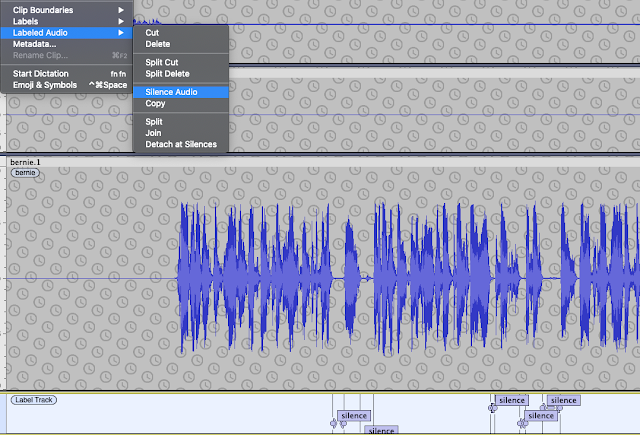 |
| Select Silence and suppress e.g. Silence Audio or manually e.g. Select and Normalize -35dB |
Multitrack
Tracks > Sync-Lock Tracks (on/off)
You can organise the structure of a recording by using new tracks for sections of audio (to organise the large scale edit).
As of Audacity 3 you can now grab the track label bar when the hand icon/tool appears. This is a really handy :-) approach for aligning track segments or to move a split selection from one track to another.
Toggle the Sync-Lock Tracks setting either synchronise (ON) edits across the tracks in parallel, or (OFF) move tracks relative to each other. This is useful if for example you want to overlap, reorder, or otherwise change the structure of the recordings, e.g. adjust fades, add transitions, change the order of speech.
Large scale edit
Your listeners want a well edited informative podcast so remember, less is more. You will have to listen (and re-listen) to your material and decide what to keep or delete. Think about the length and structure of the recording. You can change the order. You will delete stuff so do it. Concentrate on large chunks, the structure of the talk. Don’t worry about breathing, coughs and minor noises just yet.
Small scale edit
After the large scale edit more or less done, spend time on the small scale edit. This involves zooming in and fine-grained cut and pasting. But think before acting, is it really necessary to remove every single intake of breath?
For example: cut long gaps, background noises and any generally unnecessary audio. You might also cut some of the egregious 'emms and ahhs' and nervous filler speech we all use. A caution though, the small scale edit can become a journey without an end, or at least a very long journey.
Note: "Sometimes you will not want to close the gap and yet still remove the noise, for instance if somebody breathes loudly. For such occasions copy a section of audio during which nobody is speaking (e.g. at the start of the recording) and paste it over the unwanted noise. This will preserve the natural pacing of speech." (source: Cook & Holdis, CEU Podcast Library - link)
Fade-in Fade-out
Apply fade-in and fade-out when you want the speech to start or end smoothly.
 |
| A useful Audacity EQ setting |
Post-processing - Loudness Normalization
Start out by applying loudness normalization (default -23 LUFS) separately to each track - why separately? Each track has its own average. I think normalising across all tracks at the same time biases the average gain to the loudest track's level. The same thing happens with Normalize but you can use that to your advantage to selectively boost or reduce selected loud or quiet segments.
Post-processing - noise reduction (if needed)
Select a several second sample of just the noise you want to remove.
Post-processing - low pass / high pass and other ways to reduce echo?
What to do if the original recording has transient audio peaks (annoying clicks, chirps, squeaks etc)?
The following has worked for me.
Apply the low pass filter at as low a cut-off level as you can get away with e.g. 1,100 Hz, 12 dB roll-off
Then apply click removal (200/40)
Another alternative is to apply the RIAA filter using the Filter Curve EQ effect. This shifts the vocal emphasis towards the bass without over-muffling the sound. Reducing the intensity of the higher frequencies allows the listener to focus on the mid-low vocal range and deemphasises the intensity of any annoying high-end audio reflection that gets captured so easily when using a condensor mic in a room without sound treatment.
Then EQ->Normalize->Compressor->Normalize (can repeat if needed) as follows...
1. Post-processing - Graphic EQ (equalization)
Base boost plust treble boost
2. Post-processing - Normalize
Apply default (-3dB) - the waveform will push over 0.5 but keep away from 1.0
3. Post-processing - Compressor
Select -19 dB or choose a threshold between default -12dB down to as low as -30dB
Select noise floor, around -50dB
Select ratio 4.7:1 or vary, typical ratio, between 2:1 - 3:1 - 5:1
Drop attack time (0.2s) and release time (2.0s) to maximise compression applied
These settings end up boosting the volume (visually the waveform moves closer to 1.0) making it too loud and noisy so you'll need to normalize (or amplify) again...
4. Post-processing - Normalize (again)
Apply default (-3dB) or you can apply Amplify -3dB, for the same result.
The desired result being for the waveform peaks to re-balance back to around the 0.5 level.
Improving a Zoom track?
Loudness Normalization > AUMatrixReverb > ClipFix > Normalize 3 > Amplify 3
Apply Noise Reduction if a suitable noise sample is available
Apply De-Esser and De-Clicker if needed
Overall, peak levels to be no more than 3dB
 |
| AUMatrixReverb settings may help to obscure small room reverb |
 |
| AUBandpass Filter |
Finish up
Export the mp3
Finally, create the finished product, by exporting to an mp3 file.
> File > Export > Export as MP3
This mixes all tracks in the Audacity project down to a single track.
Use settings similar to the following to export your audio file.


Quality checks:
- Is the intro/outro music at a suitable level?
- Does the intro/outro transition smoothly to/from the spoken audio?
- Is the spoken audio at a suitable level? (i.e. no clipping, waveform amplitude averages around 0.5 on linear scale)
- Is the speed of speech natural?
- Large scale edit - remove fumbled speech, removed confidential disclosures, cut out a duplicate or passages that were off topic, etc.
- Small scale edit - remove ticks, emms, ahhs, sighs, distracting background, etc.
- You wouldn't normally have backing music running throughout a podcast, but in some cases, for example, background room noises leaking into the audio, so you may decide to use low volume background as a filler/distractor.
Useful links
An Audacity tutorial on mixing a narration with background music
https://manual.audacityteam.org/man/tutorial_mixing_a_narration_with_background_music.html
https://manual.audacityteam.org/man/tutorial_mixing_a_narration_with_background_music.html
Refer to the Audacity manual online (e.g. the track panel description/explanation is at manual.audacityteam.org)
An Audacity user's simple tutorial and workflow activities:
Using the Compressor in Audacity
Using Noise Removal in Audacity
On including music from other artists (for atmosphere, decoratively, for intros/outros & transitions)
In the first instance, if you know the artist ask for their permission to use their material. You may be pleasantly surprised by the positive cycle of recognition and community surrounding artist works. Make sure you acknowledge them in your show notes.
We recommend releasing under the “Attribution-NonCommercial-ShareAlike version 4.0 creative commons licence (aka CC BY-NC-SA 4.0). You can choose from a number or variations of the CC licence; CC BY, CC BY-NC, CC SA etc.
These licences can be viewed at https://creativecommons.org/licenses/by-nc-sa/4.0
Always check the royalty free claims of audio samples found online. If you want to find audio from online sources, search for CC BY titles on Soundcloud or on YouTube
The link to the YouTube channel "Of Musicians" below is a collection of a selection of royalty free original music.
Record the following information in your show notes to establish the provenance and bona fides of 3rd party music, artwork and creative content that you decide to use:
Music (CC BY-NC-SA licence)
Title: “a title”Artist: “a name”Source: “a link to the original”Licence: “CC BY-NC-SA”
Cover Art (CC BY-NC-SA licence)
Title: “a title”Artist: “a name”Source: “a link to the original”Licence: “CC BY-NC-SA”
Example workflows:
Note, don't just apply these without testing. The basic method is to select a 10s sample and preview effects/filters until you are happy with the sound.
Simple standard process
Align tracks
Per-track noise reduction
Isolate voices
De-clicker (default) on all tracks (process run-time is typically the full track duration e.g. 15-30+ minutes)
De-esser (default) on all tracks (process run-time is a small fraction of the track duration)
Loudness Normalization (-23dB LUFS)
Compressor (default)
Makeup soft and suppress clipping on small edits with Normalize.
For an original track that had a pronounced small 'room' sound and a tendency to 'clipping zone' raw i.e. the waveform looks high, square and flat.
Align and isolate
De-clicker (default) on all tracks (process run-time is typically the full track duration e.g. 15-30+ minutes)
De-esser (default) on all tracks (process run-time is a small fraction of the track duration)
Loudness Normalization (-23dB LUFS)
Compressor (default)
Loudness Normalization (-23dB LUFS) (again)
Makeup soft and suppress clipping on small edits with Normalize.
AUMultiBandCompressor on affected track (the Sub Control preset sounded nice)
Normalize all audio to push up/down to average 0.5 waveform view (to give a typical -12dB to -6dB range with -3dB peaks)
For a track with clicks and speech that sounds very wet.
De-clicker (non-default 2 pass or more) on wet track.
Isolating second voice when two mics in the same room
Switch to Spectrogram view and select vocal patches with "Spectral edit multi tool" to fade-edit cross-talk.
AUMultiBandCompressor on affected track (the Sub Control preset sounds nice)
For a track with small room reverb and 'tinny' mic
Switch to Spectrogram view and select low frequencies 1-300Hz with "Spectral edit multi tool" to fade-edit.
Apply Filter Curve EQ - apply 100Hz Rumble filter to remove 'rumble pressure' from the audio (it feels like pressing on your ears when listening with headphones).
Apply Filter Curve EQ - apply Radio filter to remove the sensation of light 'highs' pressure when listening to the audio.
Wednesday, February 7, 2024
Statista as a data source...
Note, I generally do not approve of the use of Statista as a data source. Statista is a data aggregator, not a primary source. It may be useful for identifying useful original sources but I do not regard it as an original source.
To check if UCD has campus access (Campus License International).
Click on Login and select Campus Access, you then select "University College Dublin" from the box <Select your University>. Statista then logs you in automatically.
<from Statista's website>
To check if UCD has campus access (Campus License International).
Click on Login and select Campus Access, you then select "University College Dublin" from the box <Select your University>. Statista then logs you in automatically.
<from Statista's website>
On Campus
When you are on campus, and within the university network, https://www.statista.com/ will be available through an automated IP-activation which requires no further logging in.
Off Campus
If you want to have access to Statista off campus, from home, or a cafe, you can use Shibboleth Access or EZ Proxy.Use the dropdown box to check if your campus has Shibboleth Access:
DataCamp Projects
Complete the following learning goal "Introduction to DataCamp Projects".
This short introduction to DataCamp projects introduces you to Jupyter Notebooks. Notebooks are widely used and are a really handy way of playing with data, for organising and presenting research.
If you cannot find this activity, navigate via "Learn" > Projects > Introduction to DataCamp Projects (screenshot below).
If you cannot find this activity, navigate via "Learn" > Projects > Introduction to DataCamp Projects (screenshot below).
 |
| Navigate to "Introduction to DataCamp Projects" |
Monday, February 5, 2024
Group podcast activity
Group podcast activity
Sign-up to the "Peer Group Code of Conduct" (copies distributed in-class). You can also use this to record participation as needed.
The basics
To host a 20-40 minute podcast you will need to:
- Identify a guest to interview for the pod.
- Agree the scope: 6 questions.
- Arrange a date and time for the recording.
- Host and capture the recording.
- Edit and finish for the pod.
- Custom cover art, show notes (description), and announcement text.
- Polish the finished product and publish.
Note: Cover art requirement: "Podcast feeds contain artwork that is a minimum size of 1400 x 1400 pixels and a maximum size of 3000 x 3000 pixels, 72 dpi, in JPEG or PNG format with appropriate file extensions (.jpg, .png), and in the RGB colorspace. Aim not to exceed ~300KB size file."
 |
| In this example of a podcast cover-art file I deliberately included the dotted line as part of the art. |
The live podcast format
Develop your own running order / show notes. The order of questions (and indicated responses) are merely a starting point. Include links to other material you might have referenced in the show or to point to additional content. Don't forget that the show notes will include acknowledgement for the music, images, clip art etc. (creator name url copyright/license).
The show notes / running order is merely a guide rather than a tight script and the show itself always takes its own course. Avoid reading word-for-word scripted responses - unless you have amazing voice acting skills it is nearly impossible to not to sound wooden. However the activity of preparing primes and enables you to engage nimbly with the flow of a discussion.
Your show-notes can be used to share links to online versions of visual elements, references to other material etc. For the final edited podcast, assume your audience is only able to listen to the audio file.
More tips:
What does the finished product look like?
Find inspiration in some of our other episodes on the Design Talk (dot IE) podcast.
Prep and activities:
Read, amend and sign the "Peer Group Code of Conduct" when your group is formed.
You should identify a guest to invite (let me know if you have ideas) but if you can't find a guest I'll help you to source one.
Arrange and coordinate the date/time and venue.
Up to two co-hosts assigned for the interview (review previous episodes to get a sense of the format).
Everyone to keep track of time, to prompt and track engagement during the conversation and to highlight comments or themes that arise on the group chat.
Each member to create their own edit, to edit the mp3 file down to a compact lively podcast with intro/outro etc. using Audacity.
Each member to create a podcast cover art version for the episode.
Monday, January 22, 2024
This class is supported by DataCamp
datacamp: clear as data

We think DataCamp is the best platform for self-paced learning for data science skills development.
DataCamp is the most intuitive learning platform for data science and analytics. Learn any time, anywhere and become an expert in R, Python, SQL, and more. DataCamp’s learn-by-doing methodology combines short expert videos and hands-on-the-keyboard exercises to help learners retain knowledge. DataCamp offers 350+ courses by expert instructors on topics such as importing data, data visualization, and machine learning. They’re constantly expanding their curriculum to keep up with the latest technology trends and to provide the best learning experience for all skill levels. Join over 6 million learners around the world and close your skills gap.
The value of using DataCamp
The DataCamp skills self-paced training is directly relevant to digital and business in general. Employers recognise and highly value even basic python, R, Excel or general data science skills. Everyone's paths will be different and DataCamp supports different learning needs, offering support and challenges suited to both beginner and experienced learners. More importantly the data analytical tools are directly relevant to your term paper project, whether you use python, R or Excel, ultimately the DataCamp courses will help. Some projects in DataCamp may align well with your own research projects.An introductory pathway for new starters and programming rebooters.
- The Excel Fundamentals track
- The R Programming Fundamentals track
- and many others.
- https://learn.datacamp.com/projects
- https://learn.datacamp.com/projects/166
Some thoughts on learning using DataCamp
Taking the DataCamp learning tracks early and taking them seriously is important. The knowledge and learning you will gain will stand to you in your career, although you may never end up coding for work you will have acquired a deep appreciation for the work itself and an understanding of the concerns of the people who do and who you will interact with or manage."You will inevitably encounter specific learning challenges in different tracks. The programming courses (like computer programming in general) will pose challenges of syntax, logic, even spelling. Yes, coding can be extremely frustrating for us all, regardless of experience. That is why we also offer in-person tutorials. We believe that self-directed learning still needs an element of interaction with others to succeed, to help problem solve, to overcome roadblocks. We have all encountered education models where information is presented pre-configured, where the answers are provided in plain view, merely requiring extraction and mapping to solve problems, or regurgitating at the right moment of a multiple choice question. But if you find yourself stuck on a problem and unable to make progress based on the instructions. What then? The educators in DataCamp, while providing lots of scaffolding and spoon-fed problems, actually encourage, and in many cases require, the learner to go off and explore other related content and solve problems using external resources. Using "search", drawing upon and participating in online communities such as StackExchange and other sources is both appropriate and commended. Not for copy-and-paste-code, but for phrasing the problem, following dialogue, engaging in conversation. Over time you will find yourself emboldened to take an active part in these communities, supporting others as they struggle problems like those you eventually overcame."
Tuesday, February 28, 2023
Case Based Learning CRIB Sheet
A process view for organising case based learning (aka problem based learning); to formulate self-defined and self-directed learning goals. Cases can be analysed at progressively deeper levels, from simple to more complex and/or subtle analysis as you become adept at this approach to learning.
With respect to the cases, you will get out as much as you put in. Consider using the following process and prompts.
- Case analysis process guide:
- Read the case
- Identify what you already know about a topic.
- Develop a list of potential problems evident in the case.
- State learning gaps then resolve them by finding and reading-up relevant material.
- Summarise your findings and ideas.
- Generate a synthesis.
- Present a single page capturing the above (homework).
- Retrospective (reflect on the process).
- Case analysis self-question prompts:
- Are there topics/objects in the case you need to know more about?
- Do you have applicable prior learning and experience you can bring in?
- Did the case raise questions for you? How did you answer the questions?
- Is information presented that you do not understand? Avoid highlighting non-specific generalised experience/skill gaps that you cannot address through independent research and learning.
- How did you resolve your personal knowledge gap(s)?
- Our intention is for you to show that you started to address the knowledge gap here. So, what did you learn?
- Any general benefit? Is the case applicable to inform future practice?
- Are your recommendations, prescriptions, statements or claims justifiable?
Thursday, February 9, 2023
Writing a precis

The commentary or précis of a reading/article conveys what you learnt and how you might employ the knowledge. In addition you can employ a critical or analytical interpretation, i.e. what is the intention of the authors, who is the audience, how valid are the claims?
Patterns for a basic précis:
- Sentence 1:Name of author, genre, and title of work, date in parenthesis; a rhetorically accurate verb (such as "claims," "argues," "asserts," "suggests"); and a THAT clause containing the major assertion or thesis statement in the work.
- Sentence 2: An explanation of HOW the author develops and supports the thesis, usually in chronological order.
- Sentence 3: A statement of the author's apparent purpose, followed by an "in order to" phrase.
- Sentence 4: A significant quote from the paper used in a sentence.
Focus on the article being reviewed, not so much on other readings, books, articles etc.
Please do identify key quotes from the article. These a short statements or at most a sentence or two that distill some essential aspect of the article. A key quote is used: to point to the authors' evidence or claims; to make a justification for your own arguments; to act as a foundation for your own ideas. However, there must be clear delineation between the authors' content and your use of it therefore.
- For quotes: use quotation marks followed by cite.
- For paraphrasing: follow with cite.
- For extracts and transformations like lists and tables: explain source followed by cite.
- When reviewing, do not quote the author's quotes of other authors. Instead, quote an original passage written by the author of the article you are reviewing.
Please use double quotation marks and page number to identify "the quoted text" p. 23. You could apply one of the standard citation methods if you like e.g. Harvard style:
- (Surname et al., Publication Year, p.#)
- (Surname et al., Publication Year, pp.#-range)
Using problem-based cases for self-directed learning
TLDR? Apply the following response structure for case analysis. The 6 points represent the milestones of the skills and developmental process for problem based learning: analytical, self-audit, self-critique, self-plan, synthesis, closure.
Process as follows:
- Identify up to three (max) challenges/problems evident in this case.
- State knowledge/skills you currently possess relevant to these challenges/problems.
- Identify up to three (max) personal knowledge gaps related to any aspect of this case.
- Provide evidence of key learning sources you identified to address your personal knowledge gaps.
- Propose strategic/remedial actions that may address the three (max) challenges/problems evident in this case.
Structure for a learning process centred on case studies.
How do you read a case and engage with it as a problem-based learning exercise for self-directed learning?
Let's say you are reading a case study but you aren't sure how to deal with it. On the one hand perhaps the case study presents basic statements as facts, or perhaps the case presents so much rich context that it is difficult to see the underlying challenges. It is confusing. Sometimes the problems are well sign-posted, sometimes not. PBL, problem-based cases and self-directed learning offer a way to personalise your own learning, encouraging you to explore, extrapolate and investigate wider issues under your own initiative, an investigation that addresses your personal knowledge-gaps and enables you to further your own learning objectives.
One of the goals of case based learning is to have readers react, question, go out and research, and eventually recommend some change or solution. But crucially, the reader should be looking at the challenges 'in general', the wider issues affecting similar initiatives in today's environment. Furthermore recommendations will be based on research, readings, applicable theory, and evidence; usually evidence you will have gathered yourself (aka research).
Consider case analysis as a process in which the learner poses or structures the problem, explores and shapes solutions to the problem. A reflective turn on the "case as a process" raises the circumstance where the "problems" that the case raises can be construed as personal knowledge gaps. Problem solving drives the underlying personal process of learning.
In order to put some shape on this as a process consider the following "moves":
- Diagnose: Identify the problems(s)
- Discover: Independently research the problem area(s)
- Develop: Propose a response or responses, recommendations to resolve, improve etc.
The method: in brief.
1. Quickly 'first read' the case/paper/whatever. You will skip some sentences and words. The goal is to read the whole thing in a single sitting, without taking notes, just to get the first impression.
2. After the 'first read' write a sentence or paragraph from memory. This is your initial impression after first reading. Don't go back to re-read parts or seek clarity yet.
3. 'Second read' is also quick but you now underline/circle or write a list of concepts, jargon, terms, identities that are new or confuse, or are unknown to you. These are your personal knowledge gaps. Some of these you will resolve during homework time.
4. 'Third read' you can focus on sections or impressions; come up with a minimum of at least 3 initial diagnosis (continue during homework time). Encourage a variety of analyses, otherwise everyone focuses on perhaps one big superficial criticism like 'the business strategy is broken for these reasons and needs to change'.
5. Homework, self-directed and self-paced learning; address the personal knowledge gaps, work on diagnosis, work on prescribing more than one potential remedy to the problems.
The following are similar structured processes for reading and case analysis. You will probably have your own approach or adapt and modify the steps to suit the your own style and conditions.
Schwartz et al. (2001) outline a typical sequence of learning-centred activities for case analysis.
- First encounter a problem ‘cold’, without doing any preparatory study in the area of the problem.
- Interact with each other to explore their existing knowledge as it relates to the problem.
- Form and test hypotheses about the underlying mechanisms that might account for the problem (up to their current levels of knowledge).
- Identify further knowledge gaps or learning needs for making progress with the problem.
- Undertake self-study between group meetings group to satisfy identified learning needs.
- Return to the group to integrate the newly gained knowledge and apply it to the problem.
- Repeat steps 3 to 6 as necessary.
- Reflect on the process and on the content that has been learnt.
- Clarify unknown terms or concepts in the problem description.
- Define the problem(s). List the phenomena or events to be explained.
- Analyse the problem(s). Step 1. Brainstorm. Try to produce as many different explanations for the phenomena as you [can] think of. Use prior knowledge and common sense.
- Analyse the problem(s). Step 2. Discuss. Criticize the explanations proposed and try to produce a coherent description of the processes that, according to what you think, underlie the phenomena or events.
- Formulate learning issues for self-directed learning.
- Fill the gaps in your knowledge through self-study.
- Share your findings with your group and try to integrate the knowledge acquired into a comprehensive explanation for the phenomena or events. Check whether you know enough now.
- Initial analysis: identify problems, explore extant knowledge, hypothesise, identify knowledge gaps
- Independent research: research knowledge gaps
- Synthesis: present findings – relating them to the problem(s), integrate learning from others, generate a synthesis, self-assessment of learning process, repeat ‘triple jump’ if needed.
You can also try one or more of the following methods to capture and order your analyses, diagnoses, recommendations etc.
Discover the issues...
Discover the issues...
- Create an Empathy Map (from a key actor's perspective: the person, what they see, say, do, feel, hear, think)
- Brainstorm
- Anti-problem (state the antithesis to the problem and resolve it)
- Context Map (depict rich context)
- History Map (depict the past)
- Low-Tech Social Network (sketch relationships between actors)
- Storycard the Problem(s)
- Draw the Problem(s) (graphical system depiction or representation)
- Stakeholder Analysis
- The 4 Cs or the 4 Ds or the 5 Whys (components, characteristics, challenges, characters; or discover, design, damage, deliver; or ask why 5 times)
- The SQUID (sequential question and insight diagram)
- Root cause analysis (cause-reason fishbone diagram)
- GRAVE, W. S., BOSHUIZEN, H. P. A. & SCHMIDT, H. G. (1996) Problem based learning: Cognitive and metacognitive processes during problem analysis. Instructional Science, 24, 321-341.
- SCHWARTZ, P., MENNIN, S. & WEBB, G. (Eds.) (2001) Problem-Based Learning: Case studies, experience and practice, London, Routledge.
Monday, September 19, 2022
Venture investment in emerging markets
What do the Congo, Iraq, Uganda, Bangladesh have in common? Unlikely though it might seem, emerging markets are starting to attract the attention of investors seeking to find the next big thing. One of the arguments supporting this move is that solutions designed for a developing economy often leapfrog the technological/infrastructural conditions if not constraints of a more developed economy. (link)
"Startup entrepreneurship and investment is a famously risky business, and founders and VCs overwhelmingly prefer business-friendly countries. But as new investment spreads throughout the globe, countries known as dangerous and difficult places for startups have come into play. With the help of World Bank and Crunchbase data, we look at four unexpected places where startup funding is on the rise."
Thursday, February 3, 2022
Creative Commons licence - using and sharing media legally
As creators ourselves we need to understand copyright, royalty, licences, and permissions. Especially as we publish our own work under a Creative Commons licence.
https://creativecommons.org/share-your-work/
Audio media to use/reuse/adapt
Searching for CC licensed audio on
- Freesound is a community hub offering free audio, foley and original music, requiring only acknowledgement of the artist.
- An example of CC-BY music via search on FMA (Free Music Archive)
- An example of CC-BY music via search on YouTube (being careful to ensure that the licence is appropriate) e.g.
- An example of CC-BY music via search on SoundCloud (being careful to ensure that the licence is appropriate) e.g.
- Creative Commons Music by Jason Shaw on Audionautix.com
- ICONS8 Fuge has both paid and free music, multiple licence types.
- University of Wollongong has a Sound Library of royalty free audio and sound effects that you can use and also contribute to.
Broad visual media to use/reuse/adapt
Searching for CC licensed images on
- flickr, image/video hosting service
- unplash, a stock photography service
- pixabay, for stock photography, stock footage, stock vector graphics, stock music
Subscribe to:
Posts (Atom)